How to build a Solana memecoin sniper bot with the GoldRush Streaming API
Build a Solana memecoin sniper bot in TypeScript: stream new pump.fun and Raydium pairs, filter them, buy through Jupiter and exit when liquidity drains.
A Solana sniper bot watches the chain for new tokens and liquidity pools, checks each one against your rules, and sends a buy transaction within moments of launch. This guide explains what a sniper bot is, how one works on Solana from the first on-chain event to a signed swap, and what can go wrong. Then it builds a complete bot in TypeScript: it listens for new memecoin pairs on pump.fun and Raydium with the GoldRush Streaming API, filters them, buys through Jupiter from your own wallet and RPC endpoint, and watches each position so it can sell when the pool's liquidity drains.
Solana streaming goes live in January 2027. Today the GoldRush Streaming API serves Hyperliquid. Solana support, including the new-pairs and pair-update streams this guide uses, and the full Streaming API reference launch in January 2027. You can read this guide and write the code now, and run it against the live stream once Solana is available.
What is a Solana sniper bot?
A sniper bot is a program that listens to blockchain events in real time, picks out token launches and new liquidity pools that match rules you set, and builds, signs and submits a buy transaction as soon as one qualifies. The aim is to buy in the first blocks of trading, before most people have seen the token.
The difference from trading by hand is where the time goes:
| Step | Trading by hand | Sniper bot |
|---|---|---|
| Notice the launch | A post on X or Discord, often after trading has begun | A new-pair event from a stream, as the pool is created |
| Check the token | Open an explorer, read the contract, look at liquidity | Code runs the same checks on every event |
| Prepare the trade | Open a DEX, connect a wallet, paste the address | A prepared swap instruction with the new mint filled in |
| Sign and send | Approve in the wallet | Signed with a local key and sent to an RPC node |
Why sniper bots exist on Solana
Memecoins launch on Solana all the time: fees are low, and launchpads such as pump.fun let anyone create a token in a few clicks, so new tokens and pools appear all the time. Solana's slots, the window in which a validator produces a block, are configured to last about 400 ms and may run up to 600 ms. A launch, the first buys and the first price moves can all happen within a few seconds, faster than anyone can read about a token and trade it by hand. A memecoin sniper bot closes that gap by reacting to the on-chain event itself.
How a Solana sniper bot works
A sniper bot is a pipeline with five parts:
- Data stream. A push feed of on-chain events, such as new pools, liquidity added or a token's first trades. This guide uses the GoldRush Streaming API's new-pairs stream.
- Event filter. Drops the events you never trade: the wrong DEX, the wrong quote token, missing token data.
- Decision engine. Runs your rules on what's left and decides whether to buy and how much.
- Transaction builder. Builds the swap, signs it and sends it to the network.
- Wallet and security layer. Holds the keys, keeps balances in limits and records every trade.
Data stream and event detection
The bot has to learn about a new pool as soon as it exists. Polling an RPC node over and over, for example with getSignaturesForAddress on a DEX program, is slow and wastes requests. A stream pushes each event to you as it happens. For a sniper, the event that matters is a new pair: a pool created for a token, with its mint address, the quote token it trades against, the deployer and the transaction that created it.
Decision engine
The decision engine turns an event into a yes or no. Typical rules:
- Is there enough liquidity in the pool to buy and later sell without heavy slippage?
- Does the token's creator still hold the mint authority (they can mint more) or the freeze authority (they can freeze your tokens)? Both are fields on every SPL token mint.
- Has this deployer address launched tokens that were abandoned or drained?
- Is the token quoted in SOL, or something you don't want to hold?
Keep the rules simple and deterministic. Missing a trade costs nothing; buying a token whose creator can mint or freeze at will can cost the whole position.
Transaction building and execution
To buy, the bot builds a swap instruction for the DEX that holds the pool, adds a recent blockhash, signs with its key and sends the transaction through an RPC node. Two Solana details shape this step:
- A blockhash is only accepted for about 60 to 90 seconds, so a transaction has to land before its blockhash expires (Solana docs).
- An optional prioritization fee raises a transaction's scheduling priority. During a busy launch, many bots raise it to get included sooner, which raises the cost of every buy.
Send asynchronously and check confirmation separately, so the bot keeps listening while a transaction lands.
What a launch looks like on-chain (and on EVM chains such as Monad)
A launch is not one moment but a short sequence of on-chain events, and it helps to keep three of them apart:
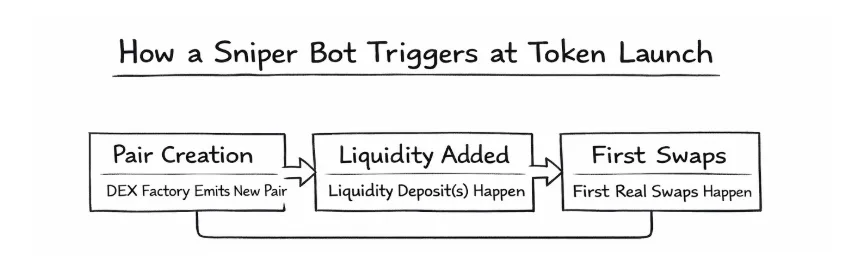
- The pair or pool is created. A DEX or launchpad creates the pool. This is only a creation event: liquidity may be tiny, nobody may ever trade it, and the same kind of pool is created over and over for spam, tests and bait. The new-pairs stream reports this stage.
- Liquidity becomes real. Liquidity arrives, sometimes in several small additions, sometimes as a large add that is partly pulled again, sometimes as just enough to trigger bots but not enough to sell into. Treat liquidity as a state that changes, not a yes or no.
- First swaps and unstable price discovery. The first trades hit, the price swings, spreads are wide and competition is at its peak.
A bot that buys at stage 1 buys pools that may never trade. Waiting until liquidity is real and the first swaps have happened costs you the very first price, but filters out most dead and bait pools. The bot below can do this: with MIN_SWAPS_BEFORE_BUY set, it subscribes to updatePairs for each new pair and only buys once the pool has your minimum liquidity and swap count.
Launches are also where MEV (maximal extractable value) is most visible. Early trading becomes a contest over transaction ordering: other bots race to get into the first blocks, some copy the same signals within seconds, and searchers can front-run your buy (buy just before you, so you pay more) or sandwich it (buy before you and sell straight after, taking the price move your buy causes). A tight slippage limit caps what a sandwich can take from you, at the cost of more failed buys.
The same design works on EVM chains. The newPairs and updatePairs subscriptions take a chain_name, so switching from StreamingChain.SOLANA_MAINNET to StreamingChain.MONAD_MAINNET and picking that chain's DEXs from the SDK's StreamingProtocol list (it includes EVM DEXs such as UNISWAP_V2, UNISWAP_V3 and OCTOSWAP_V2) gives you the same events for Monad. What changes is the execution side: an EVM signer, such as a viem account built from a private key, instead of a Solana Keypair, and a DEX router or aggregator for that chain instead of Jupiter. Monad streaming is also offline until January 2027; check the Streaming API reference then for the DEXs each chain supports. See Monad on GoldRush for the chain's coverage across GoldRush APIs.
Key features of a good sniper bot
- Real-time monitoring. A streaming connection, not polling, with reconnect logic, because the stream doesn't replay what you missed while disconnected.
- Automated buy and sell. Buy when the rules pass, then sell on a liquidity drain or a time limit you set in advance, so exits don't depend on you watching.
- Fee and slippage control. A maximum slippage per trade, so one launch can't drain the wallet.
- Separate wallets. A hot wallet holding only what the bot may spend, with profits swept to a wallet whose key never touches the server.
- Dry-run mode. The same pipeline with the send step switched off, logging what it would have bought, so you can test rules on live events at no cost.
Set up the GoldRush Streaming API connection
The GoldRush Streaming API delivers real-time blockchain data over GraphQL subscriptions, new DEX pairs among them, so your bot gets each event when it happens instead of polling. The GoldRush SDK wraps the connection: it opens one WebSocket to wss://streaming.goldrushdata.com/graphql, authenticates with your API key and gives you typed calls such as subscribeToNewPairs. Every subscription the bot makes shares that one connection.
Solana streaming and the Streaming API reference go live in January 2027; Hyperliquid streaming is available today. Until then, the code below follows the types published in the GoldRush SDK (@covalenthq/client-sdk 3.0.9). Ask GoldRush support if you want to know when Solana is enabled for your key.
What you need
- Node.js 22 or later, which has a built-in WebSocket client and
fetch. - A GoldRush API key. Sign up to get one.
- For trading: a Solana wallet you use only for the bot, its base58 private key (Phantom and other wallets can export it), and a Solana RPC endpoint.
- Optional: a Jupiter API key. Jupiter rate-limits requests without one.
Install and subscribe
Create a project and install the GoldRush SDK, the Solana libraries and bs58:
mkdir solana-sniper && cd solana-snipernpm init -ynpm pkg set type=modulenpm install @covalenthq/client-sdk @solana/web3.js@1 @solana/spl-token bs58npm install --save-dev tsx typescript @types/nodeSave this as stream.ts. It creates the client, turns each new-pair event quoted in SOL into the fields the decision engine needs, and resubscribes if the stream drops:
import { GoldRushClient, StreamingChain, type NewPairsStreamResponse, type StreamingProtocol,} from "@covalenthq/client-sdk"; const apiKey = process.env.GOLDRUSH_API_KEY;if (!apiKey) throw new Error("Set GOLDRUSH_API_KEY in your environment"); // Wrapped SOL, the SPL Token program's native mint.export const WSOL_MINT = "So11111111111111111111111111111111111111112"; // One client and one WebSocket: every subscription in the bot shares it.export const client = new GoldRushClient( apiKey, {}, { onConnecting: () => console.log("Connecting to the GoldRush Streaming API..."), onOpened: () => console.log("Connected. Waiting for new pairs."), onClosed: () => console.log("Disconnected."), onError: (err) => console.error("Connection error:", err), }); // The fields the decision engine needs, from one newPairs event.export type Candidate = { protocol: string; pair: string; mint: string; symbol: string; deployer: string; liquidity: number; marketCap: number; tx: string; seenAt: string;}; // Filter stage: keep pairs quoted in SOL and drop events without a base token.export function toCandidate(event: NewPairsStreamResponse): Candidate | null { if (!event.base_token?.contract_address) return null; if (event.quote_token?.contract_address !== WSOL_MINT) return null; return { protocol: event.protocol, pair: event.pair_address, mint: event.base_token.contract_address, symbol: event.base_token.contract_ticker_symbol, deployer: event.deployer_address, liquidity: event.liquidity, marketCap: event.market_cap, tx: event.tx_hash, seenAt: event.block_signed_at, };} // Calls onBatch with the SOL-quoted pairs in each stream message, and resubscribes if the stream errors or// closes: it doesn't replay events missed while disconnected, so reconnect quickly. Returns a function that stops it.export function watchNewPairs(protocols: StreamingProtocol[], onBatch: (candidates: Candidate[]) => void): () => void { let unsubscribe: () => void = () => {}; let stopped = false; const resubscribe = () => { if (!stopped) setTimeout(subscribe, 1000); }; function subscribe() { unsubscribe = client.StreamingService.subscribeToNewPairs( { chain_name: StreamingChain.SOLANA_MAINNET, protocols }, { next: (events) => onBatch(events.map(toCandidate).filter((c): c is Candidate => c !== null)), error: (err) => { console.error("Stream error:", err); resubscribe(); }, complete: resubscribe, } ); } subscribe(); return () => { stopped = true; unsubscribe(); };}To try it before writing the rest of the bot, save this as watch.ts. It subscribes to new pairs on pump.fun and two Raydium pool types and logs each one:
import { watchNewPairs } from "./stream";import { StreamingProtocol } from "@covalenthq/client-sdk"; const stop = watchNewPairs( [StreamingProtocol.PUMP_DOT_FUN, StreamingProtocol.RAYDIUM_AMM, StreamingProtocol.RAYDIUM_CPMM], (candidates) => { for (const c of candidates) { console.log(`[${c.protocol}] ${c.symbol} ${c.mint} pair ${c.pair} liquidity ${c.liquidity} tx ${c.tx}`); } }); process.on("SIGINT", () => { stop(); process.exit(0);});Run it with your key:
GOLDRUSH_API_KEY=your_key npx tsx watch.tsEach message from the stream is an array of new-pair events; watchNewPairs hands your callback the ones that pass the filter. To watch other launchpads, add their names to the list: the SDK's StreamingProtocol list also includes PUMP_FUN_AMM, RAYDIUM_CLMM, RAYDIUM_LAUNCH_LAB, MOONSHOT and the Meteora pool types.
What a new-pair event contains
These are the fields the SDK's subscribeToNewPairs requests for each event:
| Field | What it is |
|---|---|
chain_name, protocol, protocol_version |
Where the pool was created |
pair_address |
The new pool |
base_token, quote_token, pair |
Address, name, ticker and decimals of each |
deployer_address |
The address that created the pool |
tx_hash, block_signed_at |
The creating transaction and its block time |
event_name |
The event's name, as the stream reports it |
liquidity, supply, market_cap |
Liquidity, supply and market cap, as reported for the event |
quote_rate, quote_rate_usd |
Price fields, in the quote token and in USD |
Connect a wallet and a Solana RPC endpoint
The stream tells the bot what to buy; the wallet and an RPC endpoint let it buy. Put the settings in a .env file in the project folder, and never commit it:
# KeysGOLDRUSH_API_KEY=your_goldrush_api_keyPRIVATE_KEY=your_base58_private_keyJUPITER_API_KEY= # Solana RPC: use a private endpoint, not the public api.mainnet-beta.solana.comRPC_ENDPOINT=https://your-rpc-provider.exampleRPC_WEBSOCKET_ENDPOINT=wss://your-rpc-provider.example # What to watch: short names or StreamingProtocol valuesMONITORED_DEXES=pump.fun,raydium # TradingQUOTE_AMOUNT=0.01MIN_POOL_SIZE=0MAX_POOL_SIZE=0SLIPPAGE_BPS=500MIN_SWAPS_BEFORE_BUY=0WAIT_FOR_SWAPS_MS=60000 # Safety and exitsCHECK_IF_MINT_IS_RENOUNCED=trueAUTO_SELL=falseAUTO_SELL_DELAY_MS=0LIQUIDITY_DRAIN_PCT=20DISCORD_WEBHOOK_URL= # Leave on until you have watched the bot workDRY_RUN=true| Variable | What it does |
|---|---|
PRIVATE_KEY |
The bot wallet's secret key, base58 encoded. Anyone with it controls the wallet: fund it with only what the bot may spend. |
RPC_ENDPOINT, RPC_WEBSOCKET_ENDPOINT |
Your Solana RPC endpoint over HTTPS and WebSocket. The public endpoint is rate limited; use a private one from an RPC provider. |
QUOTE_AMOUNT |
SOL spent on each buy. |
MIN_POOL_SIZE, MAX_POOL_SIZE |
Bounds on the event's liquidity. 0 turns a bound off. |
SLIPPAGE_BPS |
The most the price may move against you, in basis points (500 is 5%). |
MIN_SWAPS_BEFORE_BUY, WAIT_FOR_SWAPS_MS |
Wait for this many swaps before buying, for up to this long. 0 buys without waiting. |
CHECK_IF_MINT_IS_RENOUNCED |
Skip tokens whose creator still holds the mint or freeze authority. |
AUTO_SELL, AUTO_SELL_DELAY_MS |
Sell automatically on a liquidity drain and, if the delay is above 0, after that long. |
LIQUIDITY_DRAIN_PCT, DISCORD_WEBHOOK_URL |
The drop in liquidity that counts as a drain, and where to post alerts. |
DRY_RUN |
true unless you set it to exactly false: the bot finds routes and logs, but signs and sends nothing. |
Save this as config.ts. It reads every setting once, with types and safe defaults, and maps the DEX names in MONITORED_DEXES to the SDK's StreamingProtocol values (raydium to RAYDIUM_AMM, pump.fun to PUMP_DOT_FUN):
import { StreamingProtocol } from "@covalenthq/client-sdk"; function required(name: string): string { const value = process.env[name]; if (!value) throw new Error(`Set ${name} in .env`); return value;}const num = (name: string, fallback: number) => (process.env[name] ? Number(process.env[name]) : fallback);const flag = (name: string, fallback: boolean) => process.env[name] === undefined ? fallback : process.env[name] === "true"; // Keys and endpointsexport const GOLDRUSH_API_KEY = required("GOLDRUSH_API_KEY");export const PRIVATE_KEY = required("PRIVATE_KEY");export const RPC_ENDPOINT = required("RPC_ENDPOINT");export const RPC_WEBSOCKET_ENDPOINT = process.env.RPC_WEBSOCKET_ENDPOINT || undefined;export const JUPITER_API_KEY = process.env.JUPITER_API_KEY ?? ""; // Tradingexport const QUOTE_AMOUNT = num("QUOTE_AMOUNT", 0.01); // SOL spent per buyexport const MIN_POOL_SIZE = num("MIN_POOL_SIZE", 0); // compared with the event's liquidity; 0 = no minimumexport const MAX_POOL_SIZE = num("MAX_POOL_SIZE", 0); // 0 = no maximumexport const SLIPPAGE_BPS = num("SLIPPAGE_BPS", 500); // 500 = 5%export const MIN_SWAPS_BEFORE_BUY = num("MIN_SWAPS_BEFORE_BUY", 0); // 0 = buy without waiting for first swapsexport const WAIT_FOR_SWAPS_MS = num("WAIT_FOR_SWAPS_MS", 60_000); // Safety and exitsexport const CHECK_IF_MINT_IS_RENOUNCED = flag("CHECK_IF_MINT_IS_RENOUNCED", true);export const AUTO_SELL = flag("AUTO_SELL", false);export const AUTO_SELL_DELAY_MS = num("AUTO_SELL_DELAY_MS", 0); // 0 = no time-based exitexport const LIQUIDITY_DRAIN_PCT = num("LIQUIDITY_DRAIN_PCT", 20);export const DISCORD_WEBHOOK_URL = process.env.DISCORD_WEBHOOK_URL ?? ""; // Safe by default: only an explicit DRY_RUN=false sends transactions.export const DRY_RUN = process.env.DRY_RUN !== "false"; // MONITORED_DEXES takes short names or StreamingProtocol values, e.g. "pump.fun,raydium,METEORA_DLMM".const DEX_ALIASES: Record<string, StreamingProtocol> = { "pump.fun": StreamingProtocol.PUMP_DOT_FUN, raydium: StreamingProtocol.RAYDIUM_AMM,};export const MONITORED_PROTOCOLS: StreamingProtocol[] = (process.env.MONITORED_DEXES ?? "pump.fun,raydium") .split(",") .map((s) => s.trim()) .filter(Boolean) .map((name) => { const protocol = DEX_ALIASES[name.toLowerCase()] ?? Object.values(StreamingProtocol).find((p) => p === name.toUpperCase()); if (!protocol) throw new Error(`Unknown DEX in MONITORED_DEXES: ${name}`); return protocol; });Save this as solana.ts. It loads the wallet's Keypair from the base58 key, opens a Connection that uses your WebSocket endpoint and confirmed commitment, and checks both at startup with getBlockHeight and getBalance:
import { PRIVATE_KEY, RPC_ENDPOINT, RPC_WEBSOCKET_ENDPOINT } from "./config";import { Connection, Keypair, LAMPORTS_PER_SOL } from "@solana/web3.js";import bs58 from "bs58"; // PRIVATE_KEY is the base58 secret key a wallet such as Phantom exports.export const wallet = Keypair.fromSecretKey(bs58.decode(PRIVATE_KEY)); export const connection = new Connection(RPC_ENDPOINT, { wsEndpoint: RPC_WEBSOCKET_ENDPOINT, commitment: "confirmed",}); // Fail at startup, not on the first trade, if the RPC endpoint or the wallet is wrong.export async function checkRpc(): Promise<void> { const height = await connection.getBlockHeight(); const balance = await connection.getBalance(wallet.publicKey); console.log(`RPC OK at block height ${height}.`); console.log(`Wallet ${wallet.publicKey.toBase58()} holds ${balance / LAMPORTS_PER_SOL} SOL.`);}Filter pairs: the decision engine
Save this as filters.ts. skipReason runs the cheap checks on the event: it ignores pairs created before the bot started and enforces your pool size bounds (toCandidate in stream.ts already dropped pairs not quoted in SOL). inspectMint then reads the token's mint account once: it skips tokens whose creator kept the mint or freeze authority, and returns the token program that owns the mint, because pump.fun and other launchpads create tokens under both the SPL Token and the Token-2022 programs:
import { CHECK_IF_MINT_IS_RENOUNCED, MAX_POOL_SIZE, MIN_POOL_SIZE } from "./config";import { connection } from "./solana";import type { Candidate } from "./stream";import { unpackMint } from "@solana/spl-token";import { PublicKey } from "@solana/web3.js"; export const BOT_START_TIME = Date.now(); // Checks on the event itself. Returns why to skip the pair, or null to keep going.export function skipReason(c: Candidate): string | null { if (new Date(c.seenAt).getTime() < BOT_START_TIME) return "created before the bot started"; if (MIN_POOL_SIZE > 0 && c.liquidity < MIN_POOL_SIZE) return `liquidity ${c.liquidity} is below MIN_POOL_SIZE`; if (MAX_POOL_SIZE > 0 && c.liquidity > MAX_POOL_SIZE) return `liquidity ${c.liquidity} is above MAX_POOL_SIZE`; return null;} // On-chain check: read the mint account once. The account's owner is the token program (SPL Token or// Token-2022), which the buy needs to derive the token account.export async function inspectMint(mint: string): Promise<{ tokenProgram: PublicKey; skip: string | null }> { const address = new PublicKey(mint); const info = await connection.getAccountInfo(address); if (!info) return { tokenProgram: PublicKey.default, skip: "mint account not found" }; const parsed = unpackMint(address, info, info.owner); if (CHECK_IF_MINT_IS_RENOUNCED && parsed.mintAuthority) return { tokenProgram: info.owner, skip: "mint authority not renounced" }; if (CHECK_IF_MINT_IS_RENOUNCED && parsed.freezeAuthority) return { tokenProgram: info.owner, skip: "freeze authority set" }; return { tokenProgram: info.owner, skip: null };}Save this as positions.ts. For now it holds the alert helper and waitForFirstSwaps, which subscribes to updatePairs for one new pair and resolves true once the pool reaches your minimum liquidity and swap count in the last five minutes, or false when time runs out. This is the "wait for real liquidity and first swaps" rule from the launch stages above:
import { DISCORD_WEBHOOK_URL, LIQUIDITY_DRAIN_PCT } from "./config";import { client } from "./stream";import { StreamingChain, StreamingInterval, StreamingTimeframe } from "@covalenthq/client-sdk"; // Log an alert and, if DISCORD_WEBHOOK_URL is set, post it to that Discord channel.export async function alert(message: string): Promise<void> { console.warn(message); if (!DISCORD_WEBHOOK_URL) return; await fetch(DISCORD_WEBHOOK_URL, { method: "POST", headers: { "Content-Type": "application/json" }, body: JSON.stringify({ content: message }), }).catch((err) => console.error("Webhook failed:", err));} // Before buying: watch a new pair until it has real liquidity and its first swaps, or give up after timeoutMs.export function waitForFirstSwaps(pair: string, minSwaps: number, minLiquidity: number, timeoutMs: number) { return new Promise<boolean>((resolve) => { let done = false; const finish = (ok: boolean) => { if (done) return; done = true; clearTimeout(timer); unsubscribe(); resolve(ok); }; const timer = setTimeout(() => finish(false), timeoutMs); const unsubscribe = client.StreamingService.subscribeToUpdatePairs( { chain_name: StreamingChain.SOLANA_MAINNET, pair_addresses: [pair] }, { next: (u) => { if (u.last_5m.swap_count.current_value >= minSwaps && u.liquidity >= minLiquidity) finish(true); }, error: () => finish(false), } ); });}Buy the token
Save this as swap.ts. It buys through Jupiter, which finds a route across Solana DEXs for any token it can trade, so the bot doesn't need a separate swap builder for pump.fun and each Raydium pool type. Jupiter's Swap API v2 /build endpoint returns a quote together with the swap instructions and a recent blockhash; the bot turns them into a VersionedTransaction, signs it locally (the key never leaves your machine) and sends it through your own RPC endpoint:
import { DRY_RUN, JUPITER_API_KEY, QUOTE_AMOUNT, SLIPPAGE_BPS } from "./config";import { connection, wallet } from "./solana";import { WSOL_MINT } from "./stream";import { createAssociatedTokenAccountIdempotentInstruction, getAssociatedTokenAddressSync } from "@solana/spl-token";import { AddressLookupTableAccount, ComputeBudgetProgram, LAMPORTS_PER_SOL, PublicKey, TransactionInstruction, TransactionMessage, VersionedTransaction,} from "@solana/web3.js";import bs58 from "bs58"; // Jupiter's Swap API v2 /build returns a quote and the swap instructions; you assemble, sign and send the// transaction through your own RPC. Check https://developers.jup.ag/docs/swap for the current endpoint.const JUPITER_BUILD_URL = "https://api.jup.ag/swap/v2/build";const MAX_COMPUTE_UNITS = 1_400_000; // Solana's per-transaction limit type ApiInstruction = { programId: string; accounts: { pubkey: string; isSigner: boolean; isWritable: boolean }[]; data: string; // base64};type BuildResponse = { outAmount: string; computeBudgetInstructions: ApiInstruction[]; setupInstructions: ApiInstruction[]; swapInstruction: ApiInstruction; cleanupInstruction: ApiInstruction | null; otherInstructions: ApiInstruction[]; addressesByLookupTableAddress: Record<string, string[]> | null; blockhashWithMetadata: { blockhash: number[]; lastValidBlockHeight: number };}; const sleep = (ms: number) => new Promise((resolve) => setTimeout(resolve, ms)); const toInstruction = (ix: ApiInstruction) => new TransactionInstruction({ programId: new PublicKey(ix.programId), keys: ix.accounts.map((a) => ({ pubkey: new PublicKey(a.pubkey), isSigner: a.isSigner, isWritable: a.isWritable, })), data: Buffer.from(ix.data, "base64"), }); // The response carries each lookup table's addresses, so no extra RPC call is needed.const toLookupTables = (raw: BuildResponse["addressesByLookupTableAddress"]) => Object.entries(raw ?? {}).map( ([key, addresses]) => new AddressLookupTableAccount({ key: new PublicKey(key), state: { deactivationSlot: BigInt("18446744073709551615"), lastExtendedSlot: 0, lastExtendedSlotStartIndex: 0, addresses: addresses.map((a) => new PublicKey(a)), }, }) ); // A token minted seconds ago may not be routable yet, and keyless requests are rate limited,// so retry with backoff before giving up.async function buildSwap(inputMint: string, outputMint: string, amount: bigint, attempts = 4): Promise<BuildResponse> { const params = new URLSearchParams({ inputMint, outputMint, amount: amount.toString(), taker: wallet.publicKey.toBase58(), slippageBps: String(SLIPPAGE_BPS), }); const headers: Record<string, string> = JUPITER_API_KEY ? { "x-api-key": JUPITER_API_KEY } : {}; for (let attempt = 1; ; attempt++) { const res = await fetch(`${JUPITER_BUILD_URL}?${params}`, { headers }); if (res.ok) return (await res.json()) as BuildResponse; const body = await res.text(); if (attempt >= attempts) throw new Error(`Jupiter /build failed (${res.status}): ${body}`); const wait = 1000 * 2 ** (attempt - 1); console.log(`No route yet (${res.status}: ${body.slice(0, 120)}). Retrying in ${wait} ms`); await sleep(wait); }} // Swap `amount` (in the input token's smallest unit) and wait for confirmation. Returns the signature,// or null in dry-run mode.export async function swap( inputMint: string, outputMint: string, amount: bigint, extra: TransactionInstruction[] = []): Promise<string | null> { const build = await buildSwap(inputMint, outputMint, amount); console.log(`Route: ${amount} in, about ${build.outAmount} out (smallest units)`); if (DRY_RUN) { console.log("DRY_RUN: not signing or sending."); return null; } const instructions = [ ...build.computeBudgetInstructions.map(toInstruction), ...extra, ...build.setupInstructions.map(toInstruction), toInstruction(build.swapInstruction), ...(build.cleanupInstruction ? [toInstruction(build.cleanupInstruction)] : []), ...build.otherInstructions.map(toInstruction), ]; const recentBlockhash = bs58.encode(Uint8Array.from(build.blockhashWithMetadata.blockhash)); const { lastValidBlockHeight } = build.blockhashWithMetadata; const lookupTables = toLookupTables(build.addressesByLookupTableAddress); const compile = (units: number) => new VersionedTransaction( new TransactionMessage({ payerKey: wallet.publicKey, recentBlockhash, instructions: [ComputeBudgetProgram.setComputeUnitLimit({ units }), ...instructions], }).compileToV0Message(lookupTables) ); // Simulate at the maximum limit, then ask for what the swap used plus 20%. const sim = await connection.simulateTransaction(compile(MAX_COMPUTE_UNITS), { sigVerify: false }); if (sim.value.err) throw new Error(`Simulation failed: ${JSON.stringify(sim.value.err)}`); const units = Math.min(MAX_COMPUTE_UNITS, Math.ceil((sim.value.unitsConsumed ?? MAX_COMPUTE_UNITS) * 1.2)); const tx = compile(units); tx.sign([wallet]); const signature = await connection.sendTransaction(tx, { skipPreflight: true, maxRetries: 2 }); console.log(`Sent: https://solscan.io/tx/${signature}`); const { value } = await connection.confirmTransaction( { signature, blockhash: recentBlockhash, lastValidBlockHeight }, "confirmed" ); if (value.err) throw new Error(`Transaction failed on-chain: ${JSON.stringify(value.err)}`); console.log(`Confirmed: https://solscan.io/tx/${signature}`); return signature;} const tokenAccount = (mint: string, tokenProgram: PublicKey) => getAssociatedTokenAddressSync(new PublicKey(mint), wallet.publicKey, false, tokenProgram); // Spend QUOTE_AMOUNT SOL on the token. The idempotent create instruction makes sure the wallet has an associated// token account for the mint, and does nothing if Jupiter's setup instructions already create it.export async function buy(mint: string, tokenProgram: PublicKey): Promise<string | null> { const ata = tokenAccount(mint, tokenProgram); const createAta = createAssociatedTokenAccountIdempotentInstruction( wallet.publicKey, ata, wallet.publicKey, new PublicKey(mint), tokenProgram ); const lamports = BigInt(Math.round(QUOTE_AMOUNT * LAMPORTS_PER_SOL)); return swap(WSOL_MINT, mint, lamports, [createAta]);} // Sell the wallet's whole balance of the token back to SOL.export async function sellAll(mint: string, tokenProgram: PublicKey): Promise<string | null> { if (DRY_RUN) { console.log(`DRY_RUN: would sell all of ${mint}.`); return null; } const { value } = await connection.getTokenAccountBalance(tokenAccount(mint, tokenProgram)); if (value.amount === "0") return null; return swap(mint, WSOL_MINT, BigInt(value.amount));}What each part does:
- Associated token account. A Solana wallet holds each token in its own associated token account (ATA).
buyaddscreateAssociatedTokenAccountIdempotentInstructionto the swap transaction, which creates the ATA if it's missing and does nothing if it exists, so the first buy of a token doesn't need a separate transaction. - Retries with backoff. A token minted seconds ago may not be routable on Jupiter yet.
buildSwapretries up to four times, waiting one, two, then four seconds, and then gives up on the token. - Compute units. The transaction is simulated once at the maximum compute limit, then sent with the units it used plus 20%. A failed simulation stops the buy before it costs a fee.
- Confirmation.
confirmTransactionwaits until the transaction is confirmed or its blockhash expires atlastValidBlockHeight, so the bot never waits on a transaction that can no longer land. - Dry run. With
DRY_RUNon,swapstops after Jupiter returns a route and logs it, without signing or sending.
Watch your positions: exit on a liquidity drain
Buying is half the trade. The biggest risk after a buy is a rug pull, and the stream that told you about the pool can also tell you when it is being emptied.
A hard rug pull is fast: the creator removes all of the pool's liquidity, or uses a mint or freeze authority they kept, and the token is worthless at once. A soft rug pull is slower: the creator removes liquidity or sells in smaller pieces over hours or days, which can look like a normal fall in price until most of the value is gone. The mint checks above stop the first kind; watching liquidity catches the second while you can still sell.
Add this to positions.ts. After a buy, watchPosition subscribes to updatePairs for the pool you hold, keeps the last liquidity value, and when liquidity falls by LIQUIDITY_DRAIN_PCT or more between two updates, it alerts and calls onDrain, which sells if AUTO_SELL is on. It also flags heavy selling (five-minute volume well above the previous five minutes while quote_rate_usd falls) and a spike in the swap count:
// Tune these. They compare the last 5 minutes with the 5 minutes before.const VOLUME_SPIKE = 3; // volume at least 3x the previous window...const SWAP_SPIKE = 3; // ...or swap count at least 3x // After buying: alert on a liquidity drain and call onDrain once. Returns a function that stops watching.export function watchPosition(pos: { pair: string; symbol: string; onDrain: () => Promise<unknown> }): () => void { let lastLiquidity = 0; let lastPrice = 0; let drained = false; return client.StreamingService.subscribeToUpdatePairs( { chain_name: StreamingChain.SOLANA_MAINNET, pair_addresses: [pos.pair] }, { next: async (u) => { const { liquidity, quote_rate_usd: price } = u; const { volume_usd, swap_count } = u.last_5m; if (!drained && lastLiquidity > 0) { const dropPct = ((lastLiquidity - liquidity) / lastLiquidity) * 100; if (dropPct >= LIQUIDITY_DRAIN_PCT) { drained = true; await alert( `Liquidity drain on ${pos.symbol}: ${lastLiquidity} -> ${liquidity} (-${dropPct.toFixed(1)}%)` ); await pos.onDrain(); } } if ( lastPrice > 0 && price < lastPrice && volume_usd.current_value >= VOLUME_SPIKE * volume_usd.previous_value ) { await alert(`Heavy selling on ${pos.symbol}: volume up, price ${lastPrice} -> ${price} USD`); } if ( swap_count.previous_value > 0 && swap_count.current_value >= SWAP_SPIKE * swap_count.previous_value ) { await alert( `Swap spike on ${pos.symbol}: ${swap_count.previous_value} -> ${swap_count.current_value} swaps per 5 min` ); } lastLiquidity = liquidity; lastPrice = price; }, error: (err) => console.error(`updatePairs error for ${pos.symbol}:`, err), } );}Why a percentage of liquidity: in a constant-product pool (x × y = k), the price impact of a sell of a given size grows as the reserves shrink, so a drop in liquidity makes your own exit more expensive even before the price falls. 20% is a starting point, not a rule; set it from what you see in dry runs. The alert goes to the console and, if you set DISCORD_WEBHOOK_URL, to a Discord channel through a plain fetch POST to the webhook URL.
Optional: alert on unusual candles
Liquidity is not the only warning sign. Add this to positions.ts to call subscribeToOHLCVPairs for the pool you hold, keep a rolling window of one-minute candles, and alert when a candle's price change or volume is more than Z_LIMIT standard deviations from the window's mean. The stream takes the pair (pool) address, not the token mint, and sends a short backfill of recent candles when you connect (the timeframe), which warms the window up before live candles arrive. Call watchCandles(c.pair, c.symbol) next to watchPosition in bot.ts to use it.
// Optional: alert when a 1-minute candle's price change or volume is more than Z_LIMIT standard deviations from// the recent window. The stream sends the last hour of candles on connect (the timeframe), which warms the window up.const Z_LIMIT = 3;const WINDOW = 30;export function watchCandles(pair: string, symbol: string): () => void { const returns: number[] = []; const volumes: number[] = []; let lastClose = 0; const z = (xs: number[], x: number) => { const mean = xs.reduce((a, b) => a + b, 0) / xs.length; const sd = Math.sqrt(xs.reduce((a, b) => a + (b - mean) ** 2, 0) / xs.length); return sd === 0 ? 0 : (x - mean) / sd; }; return client.StreamingService.subscribeToOHLCVPairs( { chain_name: StreamingChain.SOLANA_MAINNET, pair_addresses: [pair], // the pool address, not the token mint interval: StreamingInterval.ONE_MINUTE, timeframe: StreamingTimeframe.ONE_HOUR, }, { next: (candles) => { for (const c of candles) { const ret = lastClose > 0 ? (c.close - lastClose) / lastClose : 0; if ( returns.length >= 10 && (Math.abs(z(returns, ret)) > Z_LIMIT || z(volumes, c.volume) > Z_LIMIT) ) { void alert( `Unusual candle on ${symbol} at ${c.timestamp}: close ${c.close}, volume ${c.volume}` ); } returns.push(ret); volumes.push(c.volume); if (returns.length > WINDOW) (returns.shift(), volumes.shift()); lastClose = c.close; } }, error: (err) => console.error(`OHLCV error for ${symbol}:`, err), } );}Run the bot
Save this as bot.ts. It checks the RPC endpoint and wallet, subscribes to new pairs on the DEXs in MONITORED_DEXES, skips the first batch (launches you connected too late to act on), and runs each new pair through the filters, the optional wait for first swaps, the buy and the position watcher:
import { AUTO_SELL, AUTO_SELL_DELAY_MS, DRY_RUN, MIN_POOL_SIZE, MIN_SWAPS_BEFORE_BUY, MONITORED_PROTOCOLS, WAIT_FOR_SWAPS_MS,} from "./config";import { inspectMint, skipReason } from "./filters";import { waitForFirstSwaps, watchPosition } from "./positions";import { checkRpc } from "./solana";import { watchNewPairs, type Candidate } from "./stream";import { buy, sellAll } from "./swap"; const seen = new Set<string>();let firstBatch = true; async function handle(c: Candidate) { if (seen.has(c.pair)) return; seen.add(c.pair); const reason = skipReason(c); if (reason) return console.log(`Skip ${c.symbol}: ${reason}`); const { tokenProgram, skip } = await inspectMint(c.mint); if (skip) return console.log(`Skip ${c.symbol}: ${skip}`); if (MIN_SWAPS_BEFORE_BUY > 0) { const live = await waitForFirstSwaps(c.pair, MIN_SWAPS_BEFORE_BUY, MIN_POOL_SIZE, WAIT_FOR_SWAPS_MS); if (!live) return console.log(`Skip ${c.symbol}: no real liquidity and swaps within ${WAIT_FOR_SWAPS_MS} ms`); } console.log(`Buying ${c.symbol} (${c.mint}) on ${c.protocol}, pair ${c.pair}`); await buy(c.mint, tokenProgram); const exit = () => (AUTO_SELL ? sellAll(c.mint, tokenProgram) : Promise.resolve(null)); const stop = watchPosition({ pair: c.pair, symbol: c.symbol, onDrain: exit }); if (AUTO_SELL_DELAY_MS > 0) { setTimeout( () => exit() .catch((err) => console.error(`Sell ${c.symbol} failed:`, err)) .finally(stop), AUTO_SELL_DELAY_MS ); }} await checkRpc();console.log(DRY_RUN ? "DRY_RUN is on: nothing will be sent." : "DRY_RUN is off: trading with real funds."); const stop = watchNewPairs(MONITORED_PROTOCOLS, (batch) => { // Skip whatever arrives with the first message after connecting: launches you saw too late to act on. if (firstBatch) { firstBatch = false; return console.log(`Skipping ${batch.length} pair(s) from the first batch.`); } for (const c of batch) handle(c).catch((err) => console.error(`${c.symbol}: ${err.message ?? err}`));}); process.on("SIGINT", () => { stop(); process.exit(0);});Run it with Node's --env-file flag, which loads .env:
npx tsx --env-file=.env bot.tsWith DRY_RUN=true the bot connects, filters live pairs and asks Jupiter for real routes, but signs nothing. Leave it running and compare what it would have bought with what happened to those tokens. When you switch to DRY_RUN=false with a small QUOTE_AMOUNT, each buy logs a Solscan link (https://solscan.io/tx/<signature>) when it is sent and again when it is confirmed.
Risks and ethical considerations
Sniping new tokens is one of the riskiest things you can do with money on-chain. Read this before you run a bot with real funds:
- New tokens can go to zero. Many are abandoned soon after launch, and a bot that buys early holds them when they are.
- Rug pulls. A creator can pull the pool's liquidity, mint more supply or freeze holders' tokens if they kept those authorities. Checks and a drain alert lower the risk; they don't remove it, and a hard rug can empty the pool before any bot can sell.
- You compete with other bots. Other snipers and MEV searchers watch the same launches, and some will be faster or pay higher priority fees. You can be front-run or sandwiched and buy at a far worse price than you expected.
- Slippage and failed transactions. Prices move between the event and your transaction landing. Failed transactions still pay their fees.
- Key security. The bot holds a private key on a server. Keep only what it may spend in that wallet, and never commit keys or
.envfiles. - Rules and reputation. Check the terms of the platforms you trade on and the law where you live. Automated trading can break both.
Nothing in this guide is financial advice, and no bot guarantees a profit. Start in dry-run mode, then trade amounts you can afford to lose.
Frequently asked questions
What is a Solana sniper bot?
A Solana sniper bot is a program that watches for new tokens and liquidity pools on Solana, checks each against rules you set, and automatically sends a buy transaction within moments of launch. It has five parts: a data stream, an event filter, a decision engine, a transaction builder and a wallet layer.
How does a sniper bot find new tokens on Solana?
It subscribes to a stream of on-chain events instead of polling. The GoldRush Streaming API's new-pairs stream pushes an event when a pool is created on DEXs such as pump.fun and Raydium, with the token mint, quote token, deployer and creating transaction.
How does the bot buy a token on Solana?
It asks Jupiter's Swap API for a route and the swap instructions, adds an instruction that creates the wallet's associated token account if needed, builds a versioned transaction, signs it with the bot's key and sends it through its own RPC endpoint. It then confirms the transaction against the blockhash's last valid block height, and retries the route lookup with backoff when a brand-new token isn't routable yet.
How can a bot detect a rug pull?
Check the token's mint before buying: if the creator still holds the mint or freeze authority, skip it. After buying, subscribe to pair updates for the pool and alert or sell when its liquidity falls by more than a set share between updates, which catches a soft rug pull in progress. A hard rug pull can drain the pool in one transaction, so no check removes the risk.
Are Solana sniper bots profitable?
There's no guarantee. New memecoins can lose most or all of their value quickly, rug pulls happen, and other bots compete for the same launches with higher priority fees. Test in dry-run mode first and only risk money you can afford to lose.
Can I build a sniper bot on Monad or another EVM chain?
Yes, with the same streams. The new-pairs and pair-update subscriptions take a chain name, so you switch to StreamingChain.MONAD_MAINNET, pick that chain's DEXs, and replace the Solana wallet and Jupiter with an EVM signer and a DEX router for that chain. Monad streaming goes live in January 2027, like Solana.
When is GoldRush streaming available for Solana?
In January 2027. The GoldRush Streaming API serves Hyperliquid today, and Solana support, including the new-pairs stream, launches in January 2027 along with the full Streaming API reference.
Do I need my own Solana RPC node?
You need an RPC endpoint, not your own node: the bot uses it to read mint accounts, simulate, send and confirm transactions. A paid endpoint from an RPC provider is enough. The public mainnet endpoint is rate limited and not suited to a trading bot.
Next steps
- GoldRush Streaming API overview
- Solana on GoldRush: the chain's coverage across GoldRush APIs
- Monad on GoldRush: to run the same bot on an EVM chain
- Jupiter Swap API docs
- Get a GoldRush API key